QRIS Dynamic (SNAP)
Introduction
💡 Tip: Please watch this video tutorial for the complete integration workflow.
Definition of SNAP QRIS
The YUKK SNAP QRIS API allows merchants to create and manage QRIS payments seamlessly through the YUKK gateway. This standardized service enables your platform to easily generate dynamic QR codes, query real-time transaction statuses, and receive automatic payment notifications.
Purpose of the Integration
The purpose of the integration is to provide merchants with the ability to generate and manage QRIS payments seamlessly. Through this process:
- Merchants can instantly issue dynamic QRIS codes tailored to specific transaction amounts, ensuring precise and automated payment collections.
- Customers can complete their transactions easily by scanning the generated QRIS code using any supported e-wallet or mobile banking application.
- Merchants instantly receive real-time, automated payment notifications (callbacks) once the transaction is completed.
Key Parties Involved
- Merchant/Partner: The business or service provider that issues QRIS for User payments
- Acquirer (YUKK): The financial service provider that facilitates the QRIS payment process using the SNAP standard.
Core API Services
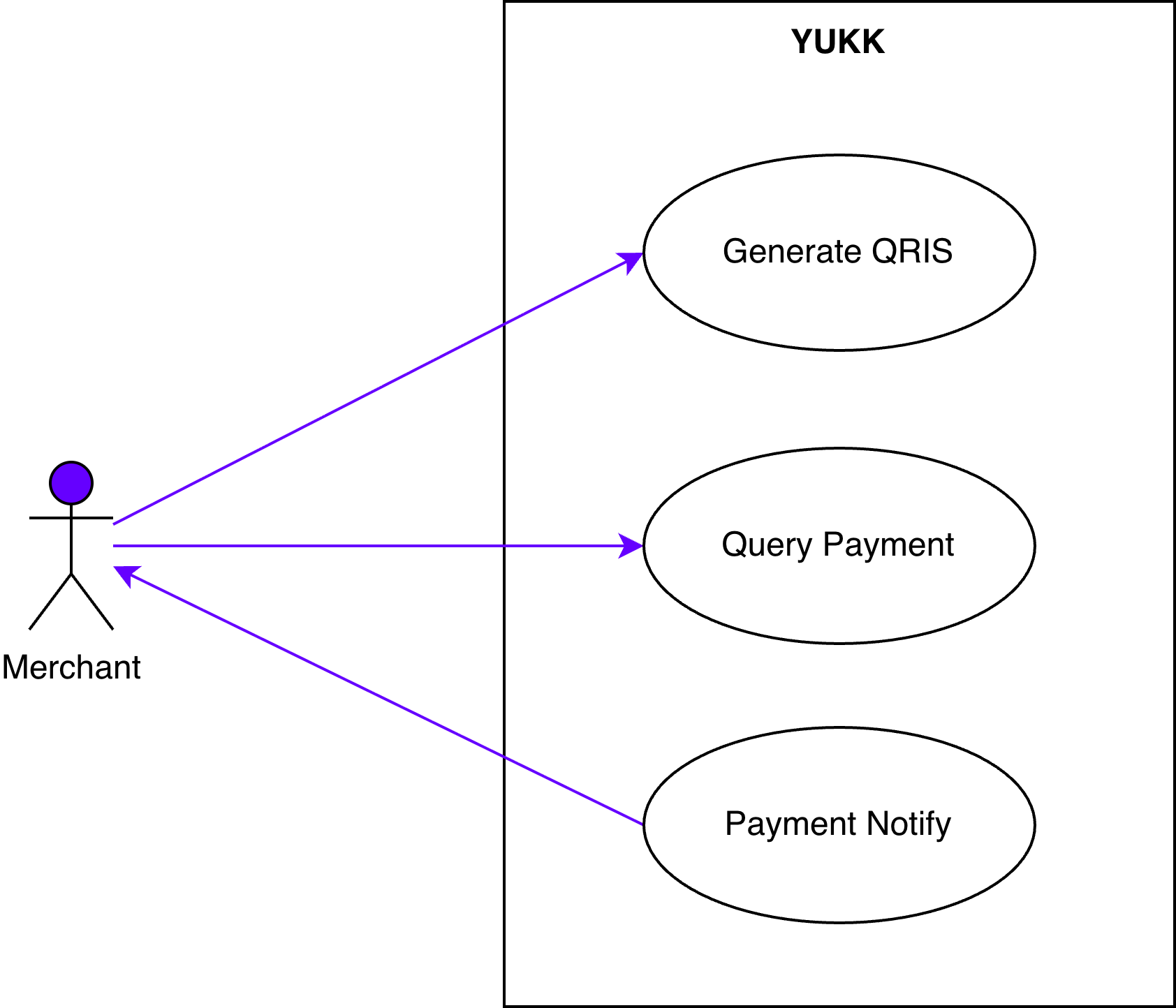
YUKK SNAP QRIS consists of three core APIs:
| API Name | Description |
|---|---|
| Generate QRIS | Requests and generates a dynamic QRIS code |
| Query Payment | Checks the real-time payment status of a transaction. |
| Notify Payment | Sends real-time payment notifications to your server. |
Pre-Integration Steps
Before starting the integration, the following steps must be completed:
- Ensure the merchant’s information has been registered in YUKK’s system by the Activation Team.
- Obtain the required integration credentials (Client ID, Client Secret, Store ID, and Public Key) from the Activation Team.
- Set up YUKK’s credentials in your system and ensure your credentials are successfully registered in YUKK’s system.
- Receive the UAT (User Acceptance Testing) document from YUKK and complete it based on your integration testing results as official proof of successful integration.
Flow Process
This section details the steps to go live, the functional use cases, and the technical sequence flow of the QRIS payment.
Integration Process
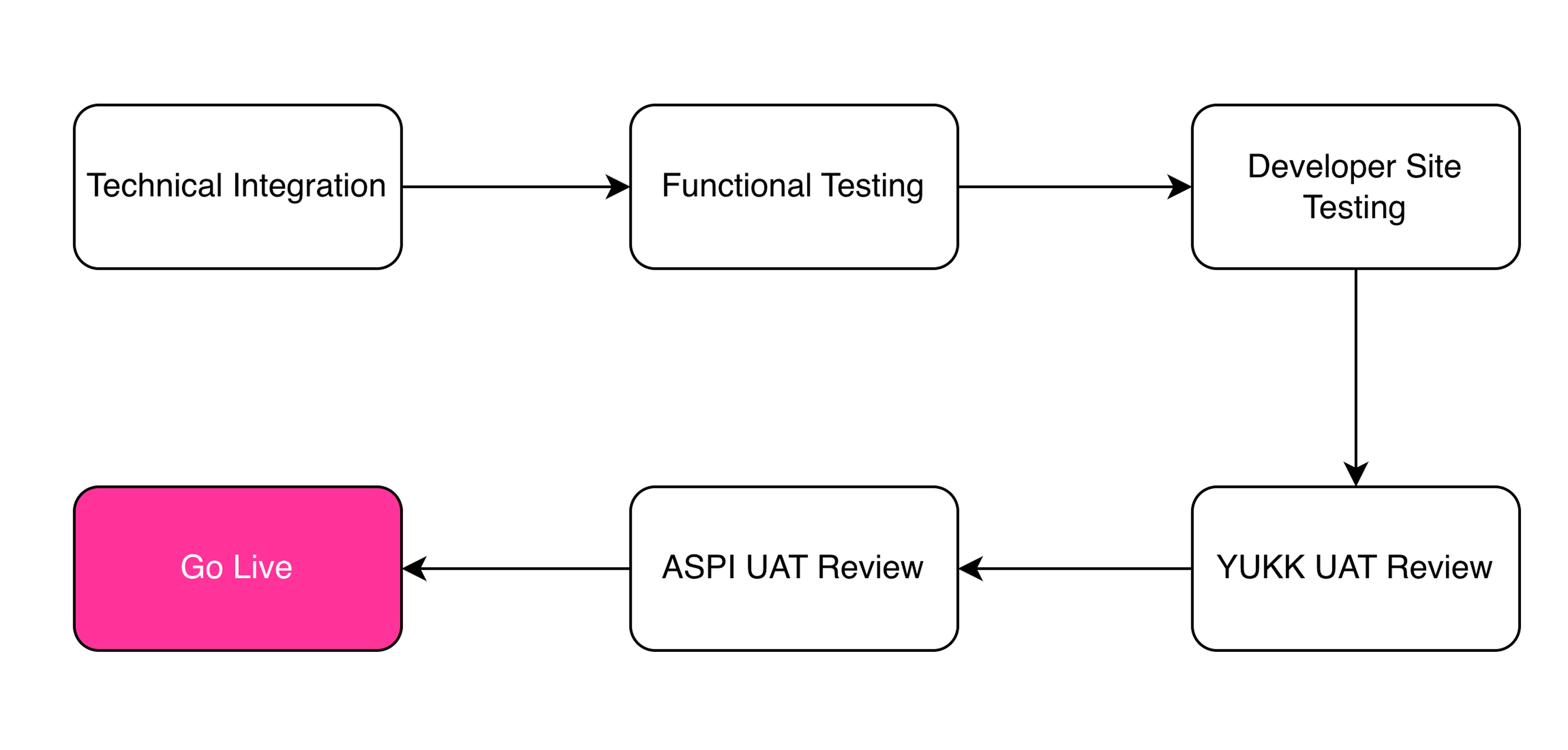
| Process | Details |
|---|---|
| Step 1. Technical Integration | The initial stage where Merchant and YUKK exchange credential data required for system configuration. In this stage, Merchant receives client credentials from YUKK and provides Merchant credentials to YUKK for configuration and service activation purposes Data required from Merchant to YUKK: - Merchant Public Key - Merchant Client ID - Merchant Client Secret - URL for B2B Access Token - URL for MPM Notify - Channel ID Credentials provided by YUKK to Merchant: - YUKK Client ID - YUKK Client Secret - YUKK Public Key - Store ID |
| Step 2. Functionality Testing | Merchant perform internal functionality testing to verify that the core API features (Generate QRIS, Query Payment, Notify Payment) work as expected. |
| Step 3. Developer Site Testing | Merchant conduct testing on the ASPI Developer Site to simulate real payment scenarios, covering both positive and negative test cases. |
| Step 4. UAT Review by YUKK | The YUKK team reviews the Merchant UAT results to confirm that the integration complies with technical and operational requirements. |
| Step 5. UAT Review by ASPI | ASPI (Indonesian Payment System Association) reviews and validates the UAT documentation submitted by the Merchant to ensure compliance with the SNAP standard. |
| Step 6. Go Live | Once all reviews are approved, the Merchant system is moved into the production environment, and QRIS transactions can be processed in real time. |
Use Case Diagram
The following figure is global process of this service:
Sequence Diagram
The following section will describe about technical detail for each process in this service.
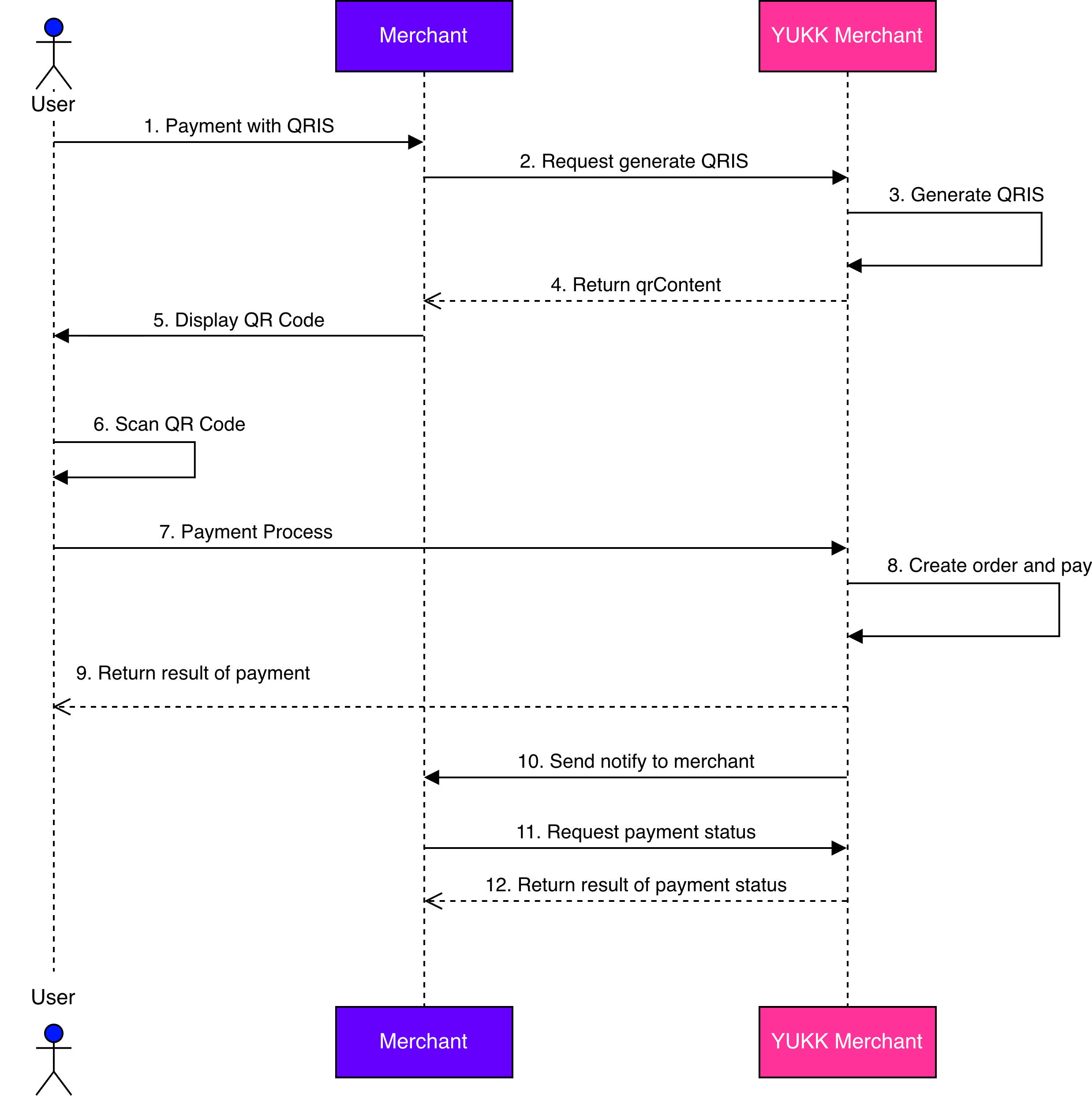
Success Generate QRIS & Payment Process
The following figure is technical detail of success generate QRIS and payment process:
Description:
| No | Process Name | Description |
|---|---|---|
| 1 | Payment with QRIS | User initiates the checkout process and selects QRIS as the payment method. |
| 2 | Request generate QRIS | Merchant requests YUKK to generate a dynamic QRIS code. |
| 3 | Generate QRIS | YUKK will generate QRIS |
| 4 | Return qrContent | YUKK send result of generate QRIS as a String in qrContent to merchant |
| 5 | Display QR code | Merchant can display QR code to user based on qrContent |
| 6 | Scan QR code | User need to scan QR |
| 7 | Payment process | YUKK processes the payment. |
| 8 | Create order and payment | YUKK will create order and payment |
| 9 | Return result of payment | YUKK returns the payment result to the user |
| 10 | Send notify to merchant | YUKK also send notify to merchant that the payment is success |
| 11 | Request payment status | Merchant can request to YUKK about payment status |
| 12 | Return result of payment status | YUKK will send the payment status to merchant based on request |
Base URL
YUKK QRIS SNAP utilizes a unified API gateway. All service requests, from initial validation to active commercial transactions, are routed through a single secure endpoint to ensure a streamlined and seamless integration.
💡 YUKK QRIS SNAP Base URL
https://snapqris.yukk.co.id/
Format Type
This section provides explanations of the supported field requirement levels and data types along with descriptions and examples. Each field in the API specification is associated with a specific format type to ensure consistency and proper validation.
Field Requirement Types
Each field in the request and response is also assigned a requirement type that defines whether the field must be provided or not:
| Type | Name | Description |
|---|---|---|
| (M) | Mandatory | The field should be input. |
| (O) | Optional | The field can be input or not. |
| (C) | Conditional | It Depends on the situation. |
Data Types
This section provides explanations of the supported data types along with their descriptions and examples. Each field in the API specification will be associated with a specific data type to ensure consistency and proper validation.
Example of Data types:
| Type | Description | Example |
|---|---|---|
| String | Alphanumeric characters | "John Doe" |
| Integer | Whole numbers without decimals | 100 |
| Decimal | Numeric values with decimal places | 99.99 |
| Boolean | Logical values. Example | true or false |
| Date/Time | Values in ISO8601 format | 2023-09-15T10:30:00 |
Integration Guides & Resources
To support the SNAP QRIS integration process, YUKK provides the following materials to help partners and developers understand the integration flow, API implementation, testing procedures, and troubleshooting guidelines for functionality and developer site testing.
💡 Link Guidebook SNAP QRIS:
Authentication for QRIS SNAP
To ensure secure and authorized access, YUKK utilizes digital signatures to validate every API request. These signatures are divided into two types based on their request function:
Used to secure the initial client credential exchange process to obtain a B2B Access Token. This digital signature is generated using your private key and validated by YUKK using your registered public key.
🔗 Visit our Asymmetric Signature Guide ↗
Used to sign and access all API services. This digital signature secures your payloads by hashing transaction data using your client secret and active access token.
🔗 Visit our Symmetric Signature Guide ↗
QRIS SNAP
QRIS is Indonesia’s standardized QR payment system by Bank Indonesia. Below are the core APIs for integrating and processing QRIS transactions.

Generate Access Token B2B
Specification Request
| API Name | Access Token B2B |
|---|---|
| Function | This API is used to get access token from merchant to YUKK as the acquirer |
| Service Code | 73 |
| Method | POST |
| Base URL | https://snapqris.yukk.co.id |
| Endpoint URL | /v1.0/access-token/b2b |
| Content Type | application/json |
Request Headers
The following table is a header of request parameter:
| Field | Type | Description |
|---|---|---|
| Content-Type | String (M) | Value always “application/json” |
| User-Agent | String (M) | Depend on library used |
| X-TIMESTAMP | String (M) | Transaction date time, in format YYYY-MM-DDTHH:mm:ss+07:00. Time must be in GMT+7 (Jakarta time) format ISO8601 without milliseconds. |
| X-CLIENT- KEY | String (M) | Use client_id provided by YUKK |
| X-SIGNATURE | String (M) | Non-Repudiation & Integrity checking X-Signature will be generated automatically with asymmetric signature SHA256withRSA(Private_Key, stringToSign).stringToSign = client_ID + “I” + XTIMESTAMP |
Request Body
The following table is a body of request parameter:
| Field | Type | Description |
|---|---|---|
| grantType | String (M) | Value: "client_credentials" The client can request an access token using only its client credentials (or other supported means of authentication) when the client is requesting access to the protected resources under its control (OAuth 2.0: RFC 6749 & 6750). |
Response Headers
The following table is a header of response parameter:
| Field | Description |
|---|---|
| Content-Type | Value always “application/json" |
Response Body
The following table is a body of response parameter:
| Field | Type | Description |
|---|---|---|
| responseCode | String (M) | Standardized 7-character status code (HTTP Status + Service Code + Case Code). Please refer to the Response Code & Message ↗ page to learn more about response code definitions. |
| responseMessage | String (M) | A descriptive message explaining the status code. |
| accessToken | String (2048) (M) | A string representing an authorization issued to the client that used to access protected resources. |
| tokenType | String (M) | The access token type provides the client with the information required to successfully utilize the access token to make a protected resource request (along with type-specific attributes). Token Type Value: "Bearer" : includes the access token string in the request. |
| expiresIn | String (M) | -Session expiry in seconds: 900 (15 minutes) -The access_token expires in 15 minutes. Please renew the token before it expires. |
POST Access Token
ℹ️ Endpoint URL to obtain the B2B Access Token
https://snapqris.yukk.co.id/v1.0/access-token/b2b
Response Headers
| X-TIMESTAMP | 2025-06-26T15:25:31+07:00 |
| X-CLIENT-KEY | 583733826598333528865851 |
| X-SIGNATURE | V7WNXlU3NiNl2sxw5s126phvmUP4DCwNoU/dldVzw6VM4EUdoGCTBWUMp4IHBonwR8oBxs+uVdZhC3tBpn5MYb62qMDZKp2lJndifNI1MX2c/3hZSTa822pXXQZfnCT4H+ktTHL7f8v8FJJzmOH2uhzkg2c+p/Vv1dNXaxaIrGitDgFLSbvAG1Th1ppm0e+hz9GCBNj7tPOrMrsHf2S/Eia7om7CXFxXeJC6V4tQjlyI/+sd6x+RfNG/MnpFqRWt86GPMtmEGr1uUpsyDkKT2MTsAMOAdix/UcYG2cbY4rVIv4ZkieFwqzgd+dv7EcoWXbBdFzoPNT8u0RH0PH7MSQ== |
| User-Agent | Postman-Husein-QA |
| Content-Type | application/json |
Response Body
{
	"grantType" : "client_credentials"
}
Request Sample
//Access Token
curl --location 'https://snapqris.yukk.co.id/v1.0/access-token/b2b' \
--header 'X-TIMESTAMP: 2025-06-26T15:25:31+07:00' \
--header 'X-CLIENT-KEY: 583733826598333528865851' \
--header 'X-SIGNATURE: V7WNXlU3NiNl2sxw5s126phvmUP4DCwNoU/dldVzw6VM4EUdoGCTBWUMp4IHBonwR8oBxs+uVdZhC3tBpn5MYb62qMDZKp2lJndifNI1MX2c/3hZSTa822pXXQZfnCT4H+ktTHL7f8v8FJJzmOH2uhzkg2c+p/Vv1dNXaxaIrGitDgFLSbvAG1Th1ppm0e+hz9GCBNj7tPOrMrsHf2S/Eia7om7CXFxXeJC6V4tQjlyI/+sd6x+RfNG/MnpFqRWt86GPMtmEGr1uUpsyDkKT2MTsAMOAdix/UcYG2cbY4rVIv4ZkieFwqzgd+dv7EcoWXbBdFzoPNT8u0RH0PH7MSQ==' \
--header 'User-Agent: Postman-Husein-QA' \
--header 'Content-Type: application/json' \
--data '{
	"grantType" : "client_credentials"
}'
Response Sample
- Body
- Header (16)
    //200 OK
    {
    "accessToken": "eyJ0eXAiOiJKV1QiLCJhbGciOiJSUzI1NiJ9.eyJhdWQiOiIxIiwianRpIjoiY2Q2N2Q2NDUyNmE1M2Y3ODIzYzY1M2E3NDVmNDgyMDRjOGI5NmJiNjZiZWI4ZGVhMDgzY2I4MGNhYzFlOTZlZDY4M2Q4ZDk3ODIxZDZhZTAiLCJpYXQiOjE3NTA5MzA1MzIuMzY2MTEyLCJuYmYiOjE3NTA5MzA1MzIuMzY2MTE1LCJleHAiOjE3NTA5MzE0MzIuMzYxMjksInN1YiI6IjQxMSIsInNjb3BlcyI6W119.hOVO9S6Ch-dgx0TirPWtXnN9iDK0huI6yVMQZOdJi561vN6DzPOjaFAnf1_LTIYn2qIGfs24h3kLOoBR2cjHfkA9ZUwu6dG1_R1M_cNlmZhJdH6vwgc8z62eEjwIwVFuqOvSNOGF91NuXmacT5oYKYAmXAEQDR0XNmmbVl8cL38LBvE4svYNq2LBq3GgSKHLVCVxH3g_lTolxLdcugQ_Qz3cXb0hsIBz3dumEE8UHJ8nx05Jm_3qkOSiNEhVnzLzyW2TQpbDBbkt9vNCCtr1vl0f1NCHMFeHHizn7wcdaAqjBNbp512bgLUYYc96Q6R1cgIrw8uJbqKCuj1X3q8isr3gwLSbh0sIRoNl5BYkYNMbqf6AwYezISzW922tzAilHL3v3QyxKqDfOvDoKvfiImaxLJQa4xTVVsRXiB4cBidxe3LnBqwwAFMhQiAHE62T7I-olPD0RUEHIvJP6JO7BSRVghk78KyypzVS4LyKyDKgAuyU9_fmGdaCAd-ev0taBg7HdgrgfwClbJU6uzopXmbjjcSkfrCgl7xYyoIxbgjq1yABxjOc3D6CAWdGnDTkk23leO08f9Csplw_ypOY6r2EPxz-C6lf5M-lqJZaagqYY9zvnki8uCXdOYM_v4Ksor2cv_euCOEKqOIGw9wei1SM_L-H3JRvNVm0cX81xlY",
    "tokenType": "Bearer",
    "expiresIn": 900,
    "responseCode": "2007300",
    "responseMessage": "Successful"
    }
| Content-Type | application/json |
| Transfer Encoding | chunked |
| Connection | keep-alive |
| Date | Thu, 26 Jun 2025 09:35:32 GMT |
| X-RateLimit-Limit | 6000000 |
| X-RateLimit-Remaining | 5999999 |
| Server | nginx |
| Cache-Control | no-cache, private |
| Access-Control-Allow-Origin | * |
| Access-Control-Allow-Credentials | true |
| Acces-Control-Allow-Methods | * |
| Access-Control-Allow-Headers | * |
| X-Cache | Miss from cloudfront |
| Via | 1.1 117c2191e94ab49ae7a622ef64537c78.cloudfront.net (CloudFront) |
| X-Amz-Cf-Pop | CGK50-P1 |
| X-Amz-Cf-Id | VUO8UiNnY2yi4TBHfPOGadp_IfHeVsCgfTWO0CeV5r_jbIiP3aWQfQ== |
Generate QRIS Dynamic API Flow
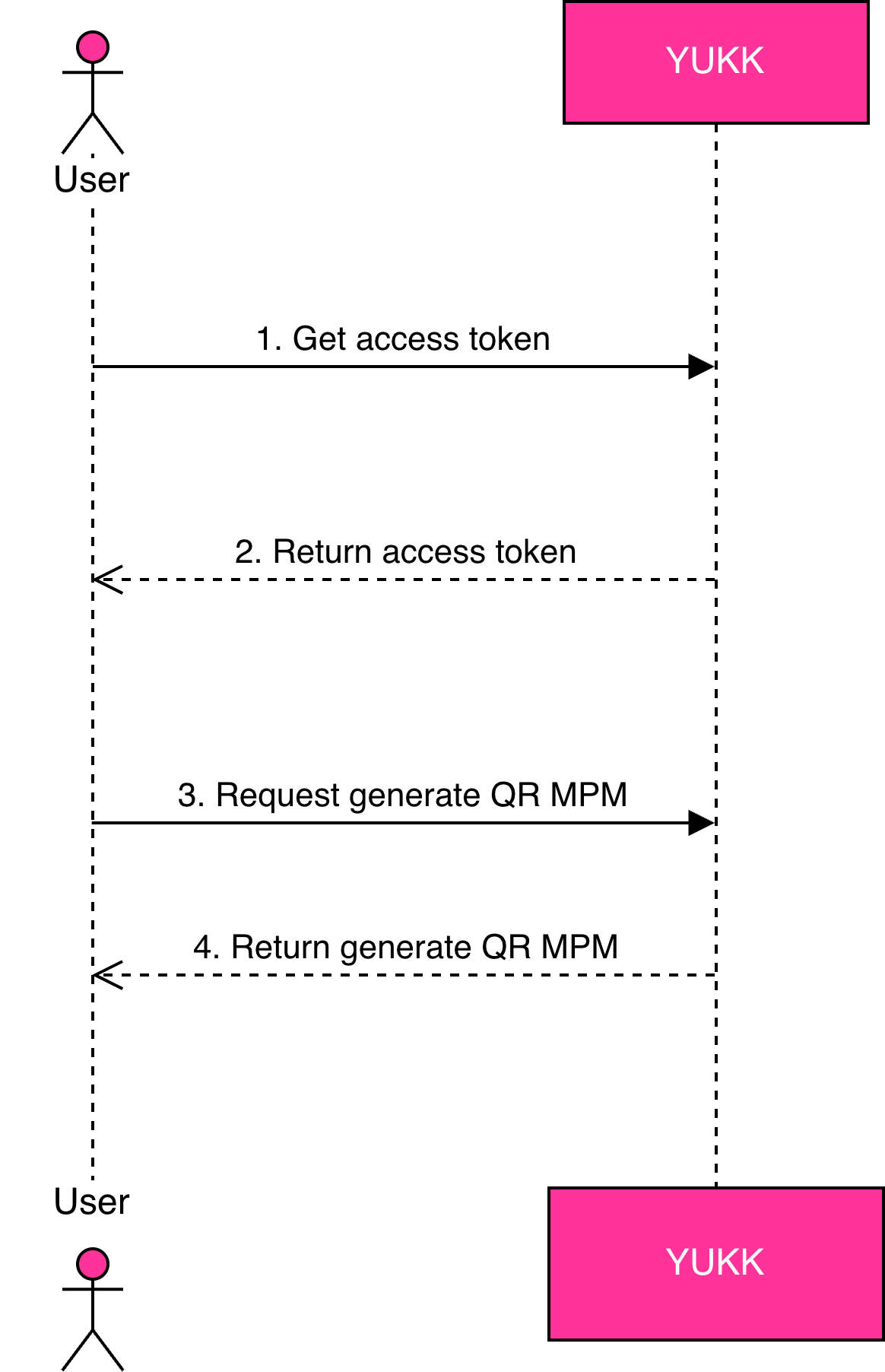
Specification Request
The following table is a specification of this API:
| API Name | Generate QR MPM |
| Function | Generates a Dynamic QRIS code for payment transactions through YUKK as the acquirer. |
| Service Code | 47 |
| Method | POST |
| Base URL | https://snapqris.yukk.co.id |
| Endpoint URL | /v1.0/qr/qr-mpm-generate |
| Content Type | application/json |
Request Header
The following table is a header of request parameter:
| Field | Type | Description |
|---|---|---|
| Content-Type | String (M) | Value always “application/json” |
| User-Agent | String (M) | Depend on library used |
| Authorization | String (M) | Represents access_token of a request string starts with keyword “Bearer ”followed by access_token (e.g. Bearer eyJraWQiOi...Jzc29zIiwiY) |
| X-TIMESTAMP | String (M) | Transaction date time, in format YYYY-MM-DDTHH:mm:ss+07:00. Time must be in GMT+7 (Jakarta time) format ISO8601 without milliseconds. |
| X-SIGNATURE | String (M) | Symmetric signature generated automatically using HMAC_SHA512 with your clientSecret as the key. Formula: stringToSign = HTTPMethod+”:“+ EndpointUrl +":"+ AccessToken +":“+ Lowercase(HexEncode(SHA256(minify(RequestBody))))+ ":“ +TimeStamp |
| X-PARTNER-ID | String (36) (M) | Use client_id was generated by YUKK |
| X-EXTERNAL-ID | String (36) (M) | Numeric String. Must be unique for each request within the same day. |
| CHANNEL-ID | String (5) (M) | Fixed value: 00001 |
Request Body
The following table is a body of request parameter:
| Field | Type | Description | Example |
|---|---|---|---|
| partnerReferenceNo | String (64) (M) | Unique transaction ID generated by the partner | 2020102900000000000001 |
| amount | Object (M) | Depend on library used | |
| value | String (16.2) (M) | Net amount of the transaction. If it's IDR then value includes 2 decimal digits. e.g. IDR 100.000,- will be placed with 100000.00 with 2 decimal, but last 2 decimal should be .00 | 100000.00 |
| currency | String (ISO4217) (3) (M) | Currency | IDR |
| FeeAmount | Object (M) | ||
| value | String (M) | this should be 0.00 | 0.00 |
| currency | String (ISO4217) (3) (M) | Currency | IDR |
| storeId | String (64) (M) | Unique storeId assigned by YUKK | abcd |
| additionalInfo | Object (M) | Optional object containing additional transaction information | { "additionalField":"{"merchantId":"SAI"}" } |
Specification Response
The following part will be describe about parameter of response in this API:
Response Header
| Field | Type | Description |
|---|---|---|
| Content-Type | String (64) (M) | Value always “application/json” |
Response Body
The following table is a body of response parameter:
| Field | Type | Description | Example |
|---|---|---|---|
| responseCode | String (7) (M) | Response code | 2004700 |
| responseMessage | String (150) (M) | Response description | Request has been processed successfully |
| referenceNo | String (64) (M) | Transaction identifier provided by YUKK system. Must be filled upon successful transaction | 2020102977770000000009 |
| partnerReferenceNo | String (64) (M) | Transaction identifier on partner system. | 2020102900000000000001 |
| qrContent | String (512) (M) | QR String MPM. | 00020101021226660014ID.CO.YUKK.WWW011893600817022000704602150308220000070460303UMI51440014ID.CO.QRIS.WWW0215ID20221466450660303UMI52045814530336054061000005802ID5924Merchant Branch Lorentzo6015TANGERANG SELAT610515159624601031690519SNAP_QRIS_0000000380712DYWKRWAZM29Z63045A71 |
| storeId | String (64) (M) | unique shop id on the partner side which is given by YUKK. | abcd |
| additionalInfo | Object (M) | Additional information | { "additionalField": "{"merchantId":"SAI"}" } |
| timeoutInSeconds | Integer (M) | Timeout time (second) from the request time. After the time exceeded the timeout, Dynamic QRIS will expire | 120 |
| timeoutDateTime | String (M) | Payment due date (DateTime) from our server time. Use not for countdown as the server time may different | 2025-01-13T14:43:02+07:00 |
POST Request Generate QRIS
ℹ️ This API is used to generate a QR Code
https://snapqris.yukk.co.id/v1.0/qr/qr-mpm-generate
Response Headers
| Authorization | Bearer eyJ0eXAiOiJKV1QiLCJhbGciOiJSUzI1NiJ9.eyJhdWQiOiIxIiwianRpIjoiY2Q2N2Q2NDUyNmE1M2Y3ODIzYzY1M2E3NDVmNDgyMDRjOGI5NmJiNjZiZWI4ZGVhMDgzY2I4MGNhYzFlOTZlZDY4M2Q4ZDk3ODIxZDZhZTAiLCJpYXQiOjE3NTA5MzA1MzIuMzY2MTEyLCJuYmYiOjE3NTA5MzA1MzIuMzY2MTE1LCJleHAiOjE3NTA5MzE0MzIuMzYxMjksInN1YiI6IjQxMSIsInNjb3BlcyI6W119.hOVO9S6Ch-dgx0TirPWtXnN9iDK0huI6yVMQZOdJi561vN6DzPOjaFAnf1_LTIYn2qIGfs24h3kLOoBR2cjHfkA9ZUwu6dG1_R1M_cNlmZhJdH6vwgc8z62eEjwIwVFuqOvSNOGF91NuXmacT5oYKYAmXAEQDR0XNmmbVl8cL38LBvE4svYNq2LBq3GgSKHLVCVxH3g_lTolxLdcugQ_Qz3cXb0hsIBz3dumEE8UHJ8nx05Jm_3qkOSiNEhVnzLzyW2TQpbDBbkt9vNCCtr1vl0f1NCHMFeHHizn7wcdaAqjBNbp512bgLUYYc96Q6R1cgIrw8uJbqKCuj1X3q8isr3gwLSbh0sIRoNl5BYkYNMbqf6AwYezISzW922tzAilHL3v3QyxKqDfOvDoKvfiImaxLJQa4xTVVsRXiB4cBidxe3LnBqwwAFMhQiAHE62T7I-olPD0RUEHIvJP6JO7BSRVghk78KyypzVS4LyKyDKgAuyU9_fmGdaCAd-ev0taBg7HdgrgfwClbJU6uzopXmbjjcSkfrCgl7xYyoIxbgjq1yABxjOc3D6CAWdGnDTkk23leO08f9Csplw_ypOY6r2EPxz-C6lf5M-lqJZaagqYY9zvnki8uCXdOYM_v4Ksor2cv_euCOEKqOIGw9wei1SM_L-H3JRvNVm0cX81xlY |
| X-TIMESTAMP | 2025-06-26T14:25:31+07:00 |
| X-PARTNER-ID | 583733826598333528865851 |
| X-SIGNATURE | vp74/K7mrRVLjOEDB/sNRXpSQoGCeXjeUWaFC2MkJTLv+vyQzf6jCEPS3H7sxbpC+XkdOgzuJUNlA8xW9HFPGg== |
| X-EXTERNAL-ID | Random10176 |
| CHANNEL-ID | 00001 |
| User-Agent | Postman-Arif-QA |
| Content Type | application/json |
Response Body
{
	"partnerReferenceNo": "QSnap-20250113012345",
	"amount": {
		"value": "1000.00",
		"currency": "IDR"
	},
	"feeAmount": {
		"value": "0.00",
		"currency": "IDR"
	},
	"storeId": "836674160822092750855087",
	"additionalInfo": {
		"additionalField": "Testing 123"
	}
}
Sample Request
//Request Generate QRIS
curl --location 'https://snapqris.yukk.co.id/v1.0/qr/qr-mpm-generate' \
--header 'Authorization: Bearer eyJ0eXAiOiJKV1QiLCJhbGciOiJSUzI1NiJ9.eyJhdWQiOiIxIiwianRpIjoiY2Q2N2Q2NDUyNmE1M2Y3ODIzYzY1M2E3NDVmNDgyMDRjOGI5NmJiNjZiZWI4ZGVhMDgzY2I4MGNhYzFlOTZlZDY4M2Q4ZDk3ODIxZDZhZTAiLCJpYXQiOjE3NTA5MzA1MzIuMzY2MTEyLCJuYmYiOjE3NTA5MzA1MzIuMzY2MTE1LCJleHAiOjE3NTA5MzE0MzIuMzYxMjksInN1YiI6IjQxMSIsInNjb3BlcyI6W119.hOVO9S6Ch-dgx0TirPWtXnN9iDK0huI6yVMQZOdJi561vN6DzPOjaFAnf1_LTIYn2qIGfs24h3kLOoBR2cjHfkA9ZUwu6dG1_R1M_cNlmZhJdH6vwgc8z62eEjwIwVFuqOvSNOGF91NuXmacT5oYKYAmXAEQDR0XNmmbVl8cL38LBvE4svYNq2LBq3GgSKHLVCVxH3g_lTolxLdcugQ_Qz3cXb0hsIBz3dumEE8UHJ8nx05Jm_3qkOSiNEhVnzLzyW2TQpbDBbkt9vNCCtr1vl0f1NCHMFeHHizn7wcdaAqjBNbp512bgLUYYc96Q6R1cgIrw8uJbqKCuj1X3q8isr3gwLSbh0sIRoNl5BYkYNMbqf6AwYezISzW922tzAilHL3v3QyxKqDfOvDoKvfiImaxLJQa4xTVVsRXiB4cBidxe3LnBqwwAFMhQiAHE62T7I-olPD0RUEHIvJP6JO7BSRVghk78KyypzVS4LyKyDKgAuyU9_fmGdaCAd-ev0taBg7HdgrgfwClbJU6uzopXmbjjcSkfrCgl7xYyoIxbgjq1yABxjOc3D6CAWdGnDTkk23leO08f9Csplw_ypOY6r2EPxz-C6lf5M-lqJZaagqYY9zvnki8uCXdOYM_v4Ksor2cv_euCOEKqOIGw9wei1SM_L-H3JRvNVm0cX81xlY' \
--header 'X-TIMESTAMP: 2025-06-26T14:25:31+07:00' \
--header 'X-PARTNER-ID: 583733826598333528865851' \
--header 'X-SIGNATURE: vp74/K7mrRVLjOEDB/sNRXpSQoGCeXjeUWaFC2MkJTLv+vyQzf6jCEPS3H7sxbpC+XkdOgzuJUNlA8xW9HFPGg==' \
--header 'X-EXTERNAL-ID: Random10176' \
--header 'CHANNEL-ID: 00001' \
--header 'User-Agent: Postman-Arif-QA' \
--header 'Content-Type: application/json' \
--data '{
	"partnerReferenceNo": "QSnap-20250113012345",
	"amount": {
		"value": "1000.00",
		"currency": "IDR"
	},
	"feeAmount": {
		"value": "0.00",
		"currency": "IDR"
	},
	"storeId": "836674160822092750855087",
	"additionalInfo": {
		"additionalField": "Testing 123"
	}
}'
Sample Response
- Body
- Header (16)
    //200 OK
    {
    "referenceNo": "00000000000000000000000965046808",
    "partnerReferenceNo": "QSnap-20250113012345",
    "qrContent": "00020101021226660014ID.CO.YUKK.WWW011893600817023002251502151109230000225150303UMI51440014ID.CO.QRIS.WWW0215ID10232871317430303UMI520458125303360540410005802ID5910Kedai CBDO6009TANGERANG610515143625301099650468080520QSnap-202501130123450712DUIHTHSYCRU763047627",
    "storeId": "836674160822092750855087",
    "additionalInfo": {
        "timeoutInSeconds": 1800,
        "timeoutDateTime": "2025-06-26T17:10:14+07:00",
        "additionalField": "Testing 123"
    },
    "responseCode": "2004700",
    "responseMessage": "Successful"
    }
| Content-Type | application/json |
| Transfer Encoding | chunked |
| Connection | keep-alive |
| Date | Thu, 26 Jun 2025 09:40:14 GMT |
| X-RateLimit-Limit | 6000000 |
| X-RateLimit-Remaining | 5999999 |
| Server | nginx |
| Cache-Control | no-cache, private |
| Access-Control-Allow-Origin | * |
| Access-Control-Allow-Credentials | no-cache, private |
| Acces-Control-Allow-Methods | * |
| Access-Control-Allow-Headers | * |
| X-Cache | Miss from cloudfront |
| Via | 1.1 46b77fe8f5f456ca3d4dd25e855a9ea4.cloudfront.net (CloudFront) |
| X-Amz-Cf-Pop | CGK50-P1 |
| X-Amz-Cf-Id | 2cKRVfJfAVSy3q6MZgk58JnPl_yuW_DQ6O5V6lb-YXb_ckbwTyS34g== |
Query Payment
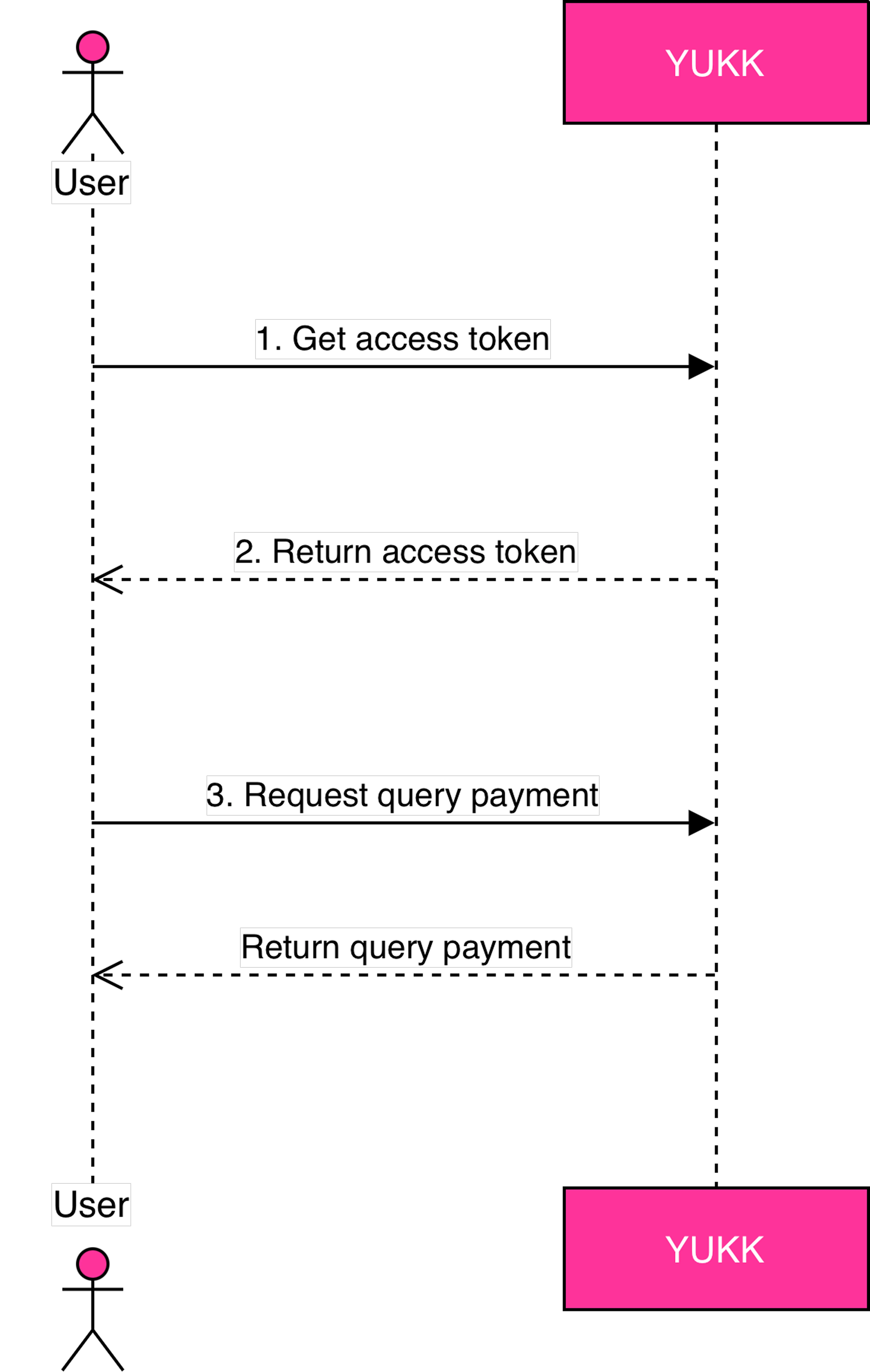
Specification Request
The following table is a specification of this API:
| API Name | Query Payment |
|---|---|
| Function | Merchant is able to send inquiry to get order status detail of the inquired order. |
| Service Code | 51 |
| Method | POST |
| Base URL | https://snapqris.yukk.co.id |
| Endpoint URL | /v1.0/qr/qr-mpm-query |
| Content Type | application/json |
Request Header
The following table is a header of request parameter:
| Field | Type | Description |
|---|---|---|
| Content-Type | String (M) | Value always “application/json” |
| User-Agent | String (M) | Depend on library used |
| Authorization | String (M) | Represents access_token of a request string starts with keyword “Bearer ”followed by access_token (e.g. Bearer eyJraWQiOi...Jzc29zIiwiY) |
| X-TIMESTAMP | String (M) | Transaction date time, in format YYYY-MM-DDTHH:mm:ss+07:00. Time must be in GMT+7 (Jakarta time) format ISO8601 without milliseconds. |
| X-SIGNATURE | String (M) | Symmetric signature generated automatically using HMAC_SHA512 with your clientSecret as the key. Formula: stringToSign = HTTPMethod+”:“+ EndpointUrl +":"+ AccessToken +":“+ Lowercase(HexEncode(SHA256(minify(RequestBody))))+ ":“ +TimeStamp |
| X-PARTNER-ID | String (36) (M) | Use client_id was generated by YUKK |
| X-EXTERNAL-ID | String (36) (M) | Numeric String. Reference number that should be unique in the same day |
| CHANNEL-ID | String (5) (M) | Use this value for CHANNEL-ID “00001” |
Request Body
The following table is a body of request parameter:
| Field | Type | Description | Example |
|---|---|---|---|
| originalPartnerReferenceNo | String (64) (M) | Use value partnerReferenceNo from /v1.0/qr/qr-mpm-generate. | 2020102900000000000001 |
| serviceCode | String (2) (M) | Transaction type indicator, Use this value “47” for serviceCode. | 47 |
| externalStoreId | String (64) (M) | unique shop id on the partner side which is given by YUKK. | abcd |
Specification Response
The following part will be describe about parameter of response in this API:
Response Header
The following table is a header of response parameter:
| Field | Type | Description |
|---|---|---|
| Content-Type | String (64) (M) | Value always “application/json” |
Response Body
The following table is a body of response parameter:
| Field | Type | Description | Example |
|---|---|---|---|
| responseCode | String (7) (M) | Response code | 2005100 |
| responseMessage | String (150) (M) | Response description | Request has been processed successfully |
| originalReferenceNo | String (64) (M) | Value referenceNo from /v1.0/qr/qr-mpm-generate. | 00000000000000000000000000000169 |
| originalPartnerReferenceNo | String (64) (M) | Value partnerReferenceNo from /v1.0/qr/qr-mpm-generate. | 2020102900000000000001 |
| serviceCode | String (2) (M) | Transaction type indicator | 47 |
| latestTransactionStatus | String (2) (M) | 00 - Success 03 - Pending | 00 |
| transactionStatusDesc | String (50) (M) | Description status transaction | success |
| paidTime | String (25) (M) | Transaction settlement time. Available only when the transaction is successful. Format ISO-8601 without milliseconds | 2022-10-17T11:39:00+07:00 |
| amount | Object (M) | ||
| value | String (16.2) (M) | Net amount of the transaction. If it's IDR then value includes 2 decimal digits. e.g. IDR 100.000,- will be placed with 100000.00 with 2 decimal, but last 2 decimal should be .00 | 100000.00 |
| currency | String (ISO4217) (3) (M) | Currency | IDR |
| FeeAmount | Object (M) | ||
| value | String (M) | this should be 0.00 | 0.00 |
| currency | String (ISO4217) (3) (M) | Currency | IDR |
| additionalInfo | Object (M) | Additional information | { "additionalField": "{"merchantId":"SAI"}" } |
POST Request Query Payment
ℹ️ This API is used to check the QRIS transaction status
https://snapqris.yukk.co.id/v1.0/qr/qr-mpm-query
Response Headers
| Authorization | Bearer eyJ0eXAiOiJKV1QiLCJhbGciOiJSUzI1NiJ9.eyJhdWQiOiIxIiwianRpIjoiY2Q2N2Q2NDUyNmE1M2Y3ODIzYzY1M2E3NDVmNDgyMDRjOGI5NmJiNjZiZWI4ZGVhMDgzY2I4MGNhYzFlOTZlZDY4M2Q4ZDk3ODIxZDZhZTAiLCJpYXQiOjE3NTA5MzA1MzIuMzY2MTEyLCJuYmYiOjE3NTA5MzA1MzIuMzY2MTE1LCJleHAiOjE3NTA5MzE0MzIuMzYxMjksInN1YiI6IjQxMSIsInNjb3BlcyI6W119.hOVO9S6Ch-dgx0TirPWtXnN9iDK0huI6yVMQZOdJi561vN6DzPOjaFAnf1_LTIYn2qIGfs24h3kLOoBR2cjHfkA9ZUwu6dG1_R1M_cNlmZhJdH6vwgc8z62eEjwIwVFuqOvSNOGF91NuXmacT5oYKYAmXAEQDR0XNmmbVl8cL38LBvE4svYNq2LBq3GgSKHLVCVxH3g_lTolxLdcugQ_Qz3cXb0hsIBz3dumEE8UHJ8nx05Jm_3qkOSiNEhVnzLzyW2TQpbDBbkt9vNCCtr1vl0f1NCHMFeHHizn7wcdaAqjBNbp512bgLUYYc96Q6R1cgIrw8uJbqKCuj1X3q8isr3gwLSbh0sIRoNl5BYkYNMbqf6AwYezISzW922tzAilHL3v3QyxKqDfOvDoKvfiImaxLJQa4xTVVsRXiB4cBidxe3LnBqwwAFMhQiAHE62T7I-olPD0RUEHIvJP6JO7BSRVghk78KyypzVS4LyKyDKgAuyU9_fmGdaCAd-ev0taBg7HdgrgfwClbJU6uzopXmbjjcSkfrCgl7xYyoIxbgjq1yABxjOc3D6CAWdGnDTkk23leO08f9Csplw_ypOY6r2EPxz-C6lf5M-lqJZaagqYY9zvnki8uCXdOYM_v4Ksor2cv_euCOEKqOIGw9wei1SM_L-H3JRvNVm0cX81xlY |
| X-TIMESTAMP | 2025-06-26T14:25:31+07:00 |
| X-PARTNER-ID | 583733826598333528865851 |
| X-SIGNATURE | qAhYt0akHBLFtSXWKC+XCIgjEEjV/oK3vLbGqTae6RNGllb41NeZSYKkU7zjEmspsN/fSeVLA+7Gcj4kviBRLg== |
| X-EXTERNAL-ID | Random67 |
| CHANNEL-ID | 00001 |
| User-Agent | Postman-Arif-QA |
| Content Type | application/json |
Response Body
{
	"originalPartnerReferenceNo": "QSnap-20250113012345",
        "serviceCode": "47",
	"externalStoreId": "836674160822092750855087"
}
Sample Request
//Request Query Payment
curl --location 'https://snapqris.yukk.co.id/v1.0/qr/qr-mpm-query' \
--header 'Authorization: Bearer eyJ0eXAiOiJKV1QiLCJhbGciOiJSUzI1NiJ9.eyJhdWQiOiIxIiwianRpIjoiY2Q2N2Q2NDUyNmE1M2Y3ODIzYzY1M2E3NDVmNDgyMDRjOGI5NmJiNjZiZWI4ZGVhMDgzY2I4MGNhYzFlOTZlZDY4M2Q4ZDk3ODIxZDZhZTAiLCJpYXQiOjE3NTA5MzA1MzIuMzY2MTEyLCJuYmYiOjE3NTA5MzA1MzIuMzY2MTE1LCJleHAiOjE3NTA5MzE0MzIuMzYxMjksInN1YiI6IjQxMSIsInNjb3BlcyI6W119.hOVO9S6Ch-dgx0TirPWtXnN9iDK0huI6yVMQZOdJi561vN6DzPOjaFAnf1_LTIYn2qIGfs24h3kLOoBR2cjHfkA9ZUwu6dG1_R1M_cNlmZhJdH6vwgc8z62eEjwIwVFuqOvSNOGF91NuXmacT5oYKYAmXAEQDR0XNmmbVl8cL38LBvE4svYNq2LBq3GgSKHLVCVxH3g_lTolxLdcugQ_Qz3cXb0hsIBz3dumEE8UHJ8nx05Jm_3qkOSiNEhVnzLzyW2TQpbDBbkt9vNCCtr1vl0f1NCHMFeHHizn7wcdaAqjBNbp512bgLUYYc96Q6R1cgIrw8uJbqKCuj1X3q8isr3gwLSbh0sIRoNl5BYkYNMbqf6AwYezISzW922tzAilHL3v3QyxKqDfOvDoKvfiImaxLJQa4xTVVsRXiB4cBidxe3LnBqwwAFMhQiAHE62T7I-olPD0RUEHIvJP6JO7BSRVghk78KyypzVS4LyKyDKgAuyU9_fmGdaCAd-ev0taBg7HdgrgfwClbJU6uzopXmbjjcSkfrCgl7xYyoIxbgjq1yABxjOc3D6CAWdGnDTkk23leO08f9Csplw_ypOY6r2EPxz-C6lf5M-lqJZaagqYY9zvnki8uCXdOYM_v4Ksor2cv_euCOEKqOIGw9wei1SM_L-H3JRvNVm0cX81xlY' \
--header 'X-TIMESTAMP: 2025-06-26T14:25:31+07:00' \
--header 'X-PARTNER-ID: 583733826598333528865851' \
--header 'X-SIGNATURE: qAhYt0akHBLFtSXWKC+XCIgjEEjV/oK3vLbGqTae6RNGllb41NeZSYKkU7zjEmspsN/fSeVLA+7Gcj4kviBRLg==' \
--header 'X-EXTERNAL-ID: Random67' \
--header 'CHANNEL-ID: 00001' \
--header 'User-Agent: Postman-Arif-QA' \
--header 'Content-Type: application/json' \
--data '{
	"originalPartnerReferenceNo": "QSnap-20250113012345",
        "serviceCode": "47",
	"externalStoreId": "836674160822092750855087"
}'
Sample Response
- Body
- Header (16)
    {
    //200 OK
    "originalReferenceNo": "00000000000000000000000965046808",
    "originalPartnerReferenceNo": "QSnap-20250113012345",
    "serviceCode": "47",
    "latestTransactionStatus": "03",
    "transactionStatusDesc": "Pending (Waiting User to Pay)",
    "paidTime": null,
    "amount": {
        "value": "1000.00",
        "currency": "IDR"
    },
    "feeAmount": {
        "value": "0.00",
        "currency": "IDR"
    },
    "additionalInfo": {
        "additionalField": "Testing 123",
        "transactionList": []
    },
    "responseCode": "2005100",
    "responseMessage": "Successful"
    }
| Content-Type | application/json |
| Transfer Encoding | chunked |
| Connection | keep-alive |
| Date | Thu, 26 Jun 2025 09:44:11 GMT |
| X-RateLimit-Limit | 6000000 |
| X-RateLimit-Remaining | 5999998 |
| Server | nginx |
| Cache-Control | no-cache, private |
| Access-Control-Allow-Origin | * |
| Access-Control-Allow-Credentials | true |
| Acces-Control-Allow-Methods | * |
| Access-Control-Allow-Headers | * |
| X-Cache | Miss from cloudfront |
| Via | 1.1 69ab9c2657f7ca4c903c8b810f7915dc.cloudfront.net (CloudFront) |
| X-Amz-Cf-Pop | CGK50-P1 |
| X-Amz-Cf-Id | U0VL4XODToh-z5wMVUX49CECnjhAaMM5toztG129W7WJRgmwRq6iMg== |
Payment Notify
This payment notification is initiated directly by YUKK. YUKK will automatically send the payment details to the partner's registered MPM Notify URL. To receive this payment notification successfully, each Partner must implement the endpoint specifications detailed below:
List of requirements on the partner side will be given to YUKK.
The following table lists the mandatory credentials and endpoints that the Partner must generate and register with YUKK during the onboading phase:
| Field | Type | Description | Example |
|---|---|---|---|
| Client Id | (M) | Partner generate client id for YUKK and YUKK will save the client id | 9JYVuBkHmPSuMAJRmpN2 |
| Client Secret | (M) | Partner generate client secret for YUKK and YUKK will save the client secret | C7BR6aXzp5XjJT0UQD7FTPJtU94C5QsVpfCBElCY |
| CHANNEL-ID | String (5) (M) | Partner create channel id and gives it to YUKK. | 00001 |
| URL Access Token | (M) | Url Access Token to create authorization. Partner's authentication endpoint URL used by YUKK to request the B2B Access Token. | https://devsnapqris.yukk.live/v1.0/access-token/b2b |
| URL MPM Notify | (M) | Url notify for send the notification. Partner's callback/webhook endpoint URL used by YUKK to send real-time payment notifications. | https://devsnapqris.yukk.live/v1.0/qr/qr-mpm-notify |
List of requirements provided by YUKK to the Partner.
| List | Description | Example |
|---|---|---|
| Public Key | YUKK’s secure RSA public key. The Partner must save and use this key for the Authorization. | -----BEGIN PUBLIC KEY----- MIIBIjANBgkqhkiG9w0BAQEFAAOCAQ8AMIIBCgKCAQEAtl+LJFKG9JcC+K7kdqYk z550Z4mYECpVHe2X+CDqlCaduq++FUk6L70pGj1FetNVPtE/EzBnHgzru/G4SCRE LIfBipJ1e9KlOhEcMu4UziAuUhIf/GVdDmpQ9vK1Mp1GkCjh8TqCKt/pf+es3fbQ a0kxNdf6/QBTMmqbzJJOW9iSwqkz6YSUb+As2Uy6cOLbIiQREt0fy6ubBalu3tOe 4P9lCrFL0gmBYre63W4yOE8TsHPVB6e06B12DqOdPfBNr25PGfWXpa426W0s46Dy wFUZXou1Zb9fU6FJakF5zPuLd2iOYCcOnyv+zfk7FUFqbgX/lzwM8r3L1I0e2m59 RQIDAQAB -----END PUBLIC KEY----- |
Generate Token Access B2B

Specification Request
The following table is a specification of this API:
| API Name | Access Token B2B |
|---|---|
| Function | This API is used to get access token from merchant to YUKK as the acquirer |
| Service Code | 73 |
| Method | POST |
| URL | /v1.0/access-token/b2b |
| Example | https://{base_url}/v1.0/access-token/b2b |
| Content Type | application/json |
Request Headers
The following table is a header of request parameter:
| Field | Type | Description |
|---|---|---|
| Content-Type | String (M) | Value always “application/json” |
| User-Agent | String (M) | Depend on library used |
| X-TIMESTAMP | String (M) | Transaction date time, in format YYYY-MM-DDTHH:mm:ss+07:00. Time must be in GMT+7 (Jakarta time) format ISO8601 without milliseconds. |
| X-CLIENT- KEY | String (M) | Use client_id was generated by Partner |
| X-SIGNATURE | String (M) | Non-Repudiation & Integrity checking X-Signature : dengan algoritma asymmetric signature SHA256withRSA(Private_Key, stringToSign).stringToSign = client_ID + “I” + XTIMESTAMP |
Request Body
The following table is a body of request parameter:
| Field | Type | Description |
|---|---|---|
| grantType | String (M) | “client_credentials” : The client can request an access token using only its client credentials (or other supported means of authentication) when the client is requesting access to the protected resources under its control (OAuth 2.0: RFC 6749 & 6750) |
Specification Response
The following part will be describe about parameter of response in this API:
Response Header
The following table is a header of response parameter:
| Field | Description |
|---|---|
| Content-Type | Value always “application/json” |
Response Body
The following table is a body of response parameter:
| Field | Type | Description |
|---|---|---|
| responseCode | String (M) | Standardized 7-character status code (HTTP Status + Service Code + Case Code). Please refer to the Response Code & Message ↗ page to learn more about response code definitions. |
| responseMessage | String (M) | A descriptive message explaining the status code. |
| accessToken | String (2048) (M) | A string representing an authorization issued to the client that used to access protected resources. |
| tokenType | String (M) | The access token type provides the client with the information required to successfully utilize the access token to make a protected resource request (along with type-specific attributes). Token Type Value: "Bearer" : includes the access token string in the request. |
| expiresIn | String (M) | -Session expiry in seconds: 900 (15 minutes) -The access_token expires in 15 minutes. Please renew the token before it expires. |
Payment Notify

Specification Request
The following table is a specification of this API:
| API Name | Access Token B2B |
|---|---|
| Function | Notify Merchant Success Payment |
| Service Code | 52 |
| Method | POST |
| URL | https://{base_url}/{version}/qr/qr-mpm-notify |
| Base URL | {base_url} |
| Endpoint URL | /{version}/qr/qr-mpm-notify |
| Example | https://{base_url}/v1.0/qr/qr-mpm-notify |
| Content Type | application/json |
Request Headers
The following table is a header of request parameter:
| Field | Type | Description |
|---|---|---|
| Content-Type | String (M) | Value always “application/json” |
| User-Agent | String (M) | Depend on library used |
| Authorization | String (M) | Represents access_token of a request string starts with keyword “Bearer ”followed by access_token (e.g. Bearer eyJraWQiOi...Jzc29zIiwiY) |
| X-TIMESTAMP | String (M) | Transaction date time, in format YYYY-MM-DDTHH:mm:ss+07:00. Time must be in GMT+7 (Jakarta time) format ISO8601 without milliseconds. |
| X-SIGNATURE | String (M) | Symmetric signature generated automatically using HMAC_SHA512 with your clientSecret as the key. Formula: stringToSign = HTTPMethod+”:“+ EndpointUrl +":"+ AccessToken +":“+ Lowercase(HexEncode(SHA256(minify(RequestBody))))+ ":“ +TimeStamp |
| X-PARTNER-ID | String (36) (M) | Use client_id was generated by Partner |
| X-EXTERNAL-ID | String (36) (M) | Numeric String. Reference number that should be unique in the same day |
| CHANNEL-ID | String (5) (M) | Use this value for CHANNEL-ID “00001” |
Request Body
The following table is a body of request parameter:
| Field | Type | Description | Example |
|---|---|---|---|
| originalReferenceNo | String (64) (M) | Original transaction identifier number on YUKK system | 2020102900000000000001 |
| originalPartnerReferenceNo | String (64) (M) | Transaction identifier on partner system. | 2020102900000000000003 |
| latestTransactionStatus | String (2) (M) | 00 - Success | 00 |
| transactionStatusDesc | String (50) (M) | Description status transaction | success |
| amount | Object (M) | ||
| value | String (16.2) (M) | Net amount of the transaction. If it's IDR then value includes 2 decimal digits. e.g. IDR 100.000,- will be placed with 100000.00 with 2 decimal, but last 2 decimal should be .00 | 100000.00 |
| currency | String (ISO4217) (3) (M) | Currency | IDR |
| paidTime | String (25) (M) | Transaction date ISO-8601 without milliseconds, paid time value could be “null” if latestTransactionStatus 03 Pending | 2022-10-17T11:39:00+07:00 |
| amount | Object (M) | ||
| value | String (16.2) (M) | Net amount of the transaction. If it's IDR then value includes 2 decimal digits. e.g. IDR 100.000,- will be placed with 100000.00 with 2 decimal, but last 2 decimal should be .00 | 100000.00 |
| currency | String (ISO4217) (3) (M) | Currency | IDR |
| externalStoreId | String (64) (M) | unique shop id on the partner side which is given by YUKK. | abcd |
| additionalInfo | Object (M) | Additional information | { “additionalField”:null, “rrn”:”210430233071” } |
| additionalField | String (M) | Additional Field sent by partner upon calling API Request Dynamic QRIS | {"merchantId":"SAI"} |
| rrn | String (M) | Payment reference code from YUKK (RRN) for cross check, dispute, and refund matters. | 210430233071 |
Specification Response
The following part will be describe about parameter of response in this API:
Response Header
The following table is a header of request parameter:
| Field | Type | Description |
|---|---|---|
| grantType | String (M) | Value always “application/json” |
Response Body
The following table is a body of request parameter:
| Field | Type | Description | Example |
|---|---|---|---|
| responseCode | String (7) (M) | Response code | 2005200 |
| responseMessage | String (150) (M) | Response description | Successful |
Detail Flow Response
Whenever a payment notification has been sent via webhook URL, partner should respond it by giving a success response code 2005200. Otherwise, the system will retry to hit partner’s webhook.
If the request to webhook is not responded until timeout or response code other than ‘2005200’, the system will retry the request with specification as follows:
- Max Retry : 3 attempts
- Interval Retry : 15 seconds
Otherwise we stop sent notification.
Notes Notification Validation Recommendation
Upon receiving a notification, users are advised to perform validation on the notification details before changing its status in the system to 'Success'. Ensure that the transaction ID and amount are correct. If they are correct, proceed to update the status to 'Success' accordingly.