QRIS Static
Introduction
Definition of QRIS Static
The YUKK QRIS Static service allows merchants to accept QRIS payments effortlessly through pre-generated QR code placard displays. It provides a fixed QR code for physical retail counters, enabling customers to scan the QR code and manually enter the payment amount using their preferred banking or e-wallet application while delivering automated real-time payment notifications (webhooks) directly to your backend system.
Key Differences: QRIS Static vs. QRIS Dynamic
The table below highlights the core differences between QRIS Static and QRIS Dynamic:
| Aspect | QRIS Static | QRIS Dynamic |
|---|---|---|
| QR Code Generation | Fixed: 1 physical QR Static for all transactions. | Dynamic: Unique QR generated per transaction. |
| Nominal Input | Customer Manual Input: Customer types the amount after scanning. | Merchant Defined: Fixed amount set by the merchant. The payment amount is embedded in the QR and cannot be modified by the customer. |
| Validity & Expiry | No Expiry: Permanent and reusable indefinitely. | Time-Bound: Expires automatically after a set timeout period (default: 1800s). |
| Transaction Reference | Post-Payment Assigned: QR does not contain order ID; transaction reference is generated by the gateway post-payment. | Pre-assigned: Merchant order ID is embedded into the QR payload prior to customer scanning. |
| Integration Complexity | Simpler Implementation: Physical QR setup requiring zero API calls to issue QR; relies solely on webhook notifications. | API-Based: Requires full backend API integration to generate unique QR codes per transaction session. |
Flow Process
The diagram and steps below detail the complete onboarding, QR provisioning, customer payment, and automated notification lifecycle:
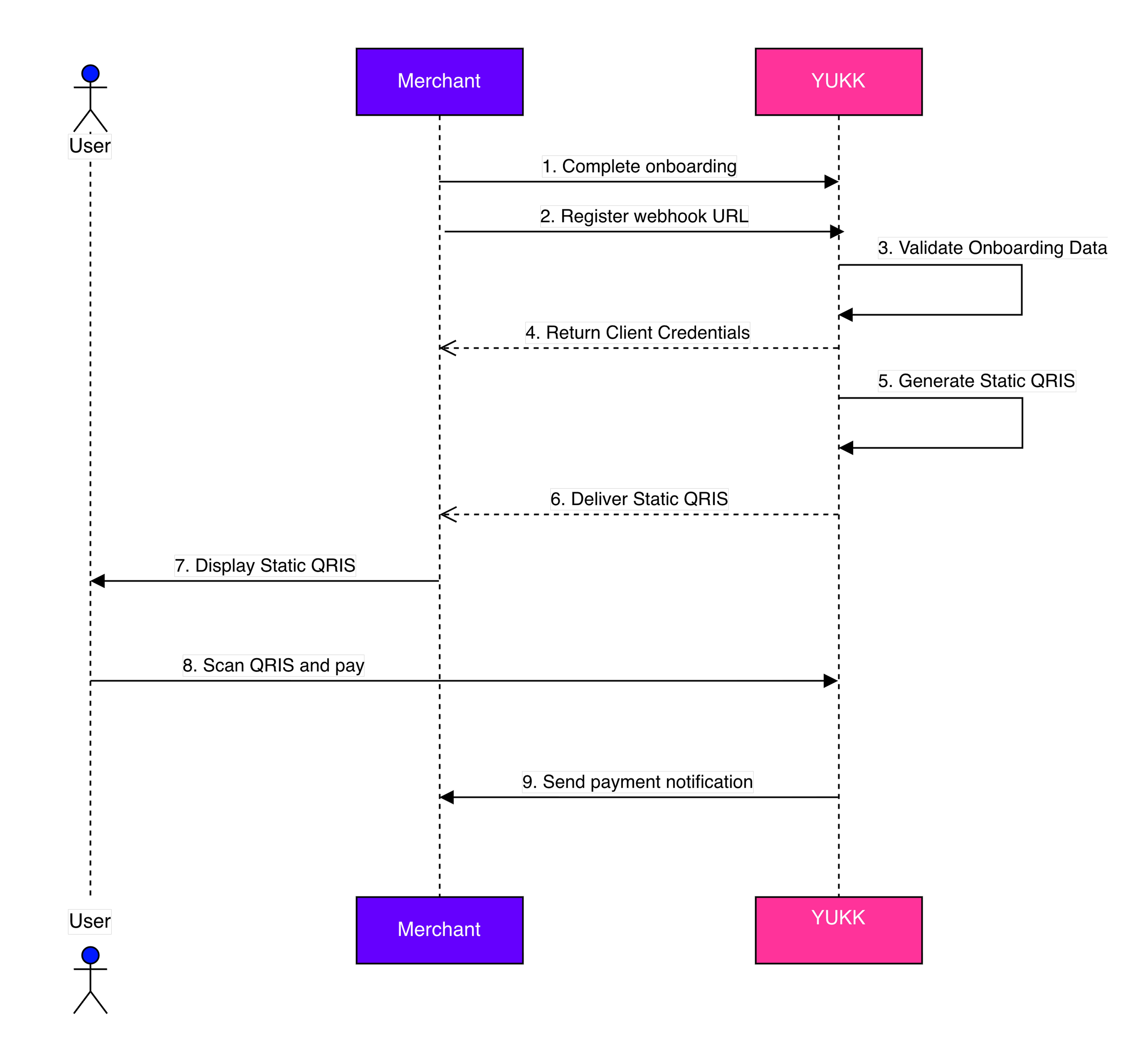
Description:
| No | Process | Details |
|---|---|---|
| 1 | Complete Onboarding | Merchant completes the onboarding process with YUKK. |
| 2 | Register Webhook URL | Merchant registers their server webhook URL with YUKK to receive automated payment callbacks. |
| 3 | Validate Onboarding Data | YUKK verifies the submitted Merchant profile, branch locations, and registered webhook parameters in the gateway system. |
| 4 | Return Credentials | Once onboarding is validated, YUKK issues and returns the integration credentials—including client_id, client_secret, and store MID—for each Merchant store. |
| 5 | Generate Static QRIS | YUKK generates the fixed Static QRIS asset for the designated store branch in both digital image and printable formats. |
| 6 | Deliver Static QRIS | YUKK delivers the generated Static QRIS assets to Merchant. |
| 7 | Display Static QRIS | Merchant displays the physical Static QR display at their retail checkout counter. |
| 8 | Scan QR Code & Pay | The customer scans the Static QR display using any bank or e-wallet mobile app, manually inputs the payment amount, and completes the transaction. |
| 9 | Send Payment Notification | For every successful payment made by scanning the Static QRIS, YUKK automatically dispatches an asynchronous payment notification (webhook) to Merchant's registered webhook URL. |
QRIS Static Payment Notification
The Payment Notification service is an asynchronous, server-to-server HTTP POST callback dispatched by YUKK immediately after a customer successfully scans and settles a payment on a Static QRIS.
Specification Payment Notification
This section details the technical specifications, headers, request body parameters, and sample cURL for the payment notification webhook that YUKK automatically dispatches to the Merchant's registered URL upon every successful transaction.
Request Header
| Field | Description |
|---|---|
| client-id | Use client_id was generated by YUKK |
| signature-key | Signature key used to validate the source of the request Formula: hash("sha512", {JSON Request Body String} + client_secret) |
| Content-Type | Content type, value always “application/json” |
Request Body
| Field | Type | Description |
|---|---|---|
| nominal | Number (M) | Total transaction amount |
| paid_by | String (M) | Name of the payer / customer |
| payment_method | String (M) | Name of the QRIS payment issuer |
| merchant_branch | String (M) | Name of the Merchant |
| rrn | String (M) | RRN used as the unique identifier for the QRIS transaction |
| transaction_time | Timestamp (M) | Date and time of the transaction Format: "d-M-Y H:i:s" |
Sample Request
curl --request POST \
--url https://example.com/ \
--header 'Content-Type: application/json' \
--header 'client-id: 6e062d5a13e3333528865851' \
--header 'signature-key: 3ce1c79f56f8b731d8bf3sNRXpSQoGCeXjeUWaFC2MkJTLv+vyQzf6jCEPS3' \
--data '{
"nominal": 10000,
"paid_by": "JOHN DOE",
"payment_method": "YUKK (93600817)",
"merchant_branch": "MATCHA COCONUT DEPOK",
"rrn": "123456789012",
"transaction_time": "12-Aug-2026 09:19:27"
}'